

Process Improvement through Documentation
|
April 29, 2026
|

7 Essential Process Document Samples for Streamlined Workflows
Key Highlights
- SowFlow provides an intuitive platform for creating SOPs, enabling seamless workflow documentation directly from the browser.
- 91% of businesses report improved visibility into processes after automation, highlighting the importance of efficient record-keeping.
- Google Docs allows for real-time collaboration, enhancing the quality and relevance of process documentation through immediate feedback.
- Notion offers a flexible workspace for creating customised documentation systems, addressing dissatisfaction in current document management methods.
- Cflow streamlines document review processes with organised workflows, reducing errors and enhancing communication.
- SowFlow enables interactive user training documentation, improving onboarding efficiency and minimising lengthy training sessions.
- Microsoft AI Builder automates document processing tasks, significantly speeding up workflows and reducing manual errors.
- GitHub supports version control and documentation management for software development, enhancing collaboration and project transparency.
- Procurement.govt.nz provides standardised templates that improve compliance rates and reduce administrative burdens in procurement processes.
- Google BigQuery offers documentation tools for data management, promoting clarity and informed decision-making while reducing productivity losses.
Introduction
You might be wondering how the efficiency of your organizational workflows can really take off. Well, it often hinges on the effectiveness of process documentation. As more businesses jump on the automation and collaborative tools bandwagon, having well-structured process document samples becomes super important. In this article, we’ll explore seven essential resources that not only streamline workflows but also boost productivity and compliance across various sectors. But with so many options out there, how can you figure out which tools will truly transform your documentation practices and drive operational success? Let’s dive in!
SowFlow: Instant SOP Creation for Streamlined Workflows
You might be wondering how to quickly and easily create process document samples for . Well, SowFlow has got you covered! It offers an that empowers you to document workflows seamlessly. With advanced technology, your team can record workflows straight from your browser using a handy . This means your records are not only comprehensive but also super accessible, which really helps foster a .
Now, let’s dive into why this matters. By focusing on , SowFlow helps organizations maintain , which can significantly reduce chaos and boost productivity. In fact, did you know that:
- 91% of businesses report better visibility into their processes after automating?
- 70% of business owners believe automation helps scale operations?
This highlights just how important are for .
As more organizations jump on the automation bandwagon, the trend towards is only set to grow. By 2025, a whopping 80% of companies are expected to use intelligent automation! And let’s not forget that 75% of businesses will have multiple data hubs established by 2024. This really emphasizes the crucial role that organized records and process document samples play in enhancing operational efficiency and achieving strategic goals.
And here’s a thought from Marina Coelho, a DevRel Engineer at Google: "By implementing effective strategies for written content, businesses can mitigate financial losses, enhance productivity, reduce environmental impact, and foster a ." So, what are you waiting for? It’s time to rethink !

Google Docs: Collaborative Document Creation for Teams
You might be wondering how Google Docs has become such a go-to tool for group collaboration. Well, it lets multiple users jump into documents at the same time, making ! With its handy commenting and suggestion features, everyone can give , which really gets all group members involved in the writing process. This kind of collaborative vibe not only keeps things transparent but also boosts the quality of the final documents.
Now, think about how Google Docs allows teams to collaboratively create and update for . It really simplifies workflows and ensures that your records stay relevant and accurate. As more organizations embrace , the ability to get is becoming essential for . So, why not dive in and explore how Google Docs can make your more effective and engaging?

Notion: Flexible Workspace for Process Documentation
You might be wondering how Notion can help you streamline your work. Well, it’s a versatile workspace that effortlessly combines notes, databases, and task management. This means your team can create that fit your unique workflows. And let’s be honest, that flexibility is crucial! Research shows that only 30% of knowledge workers are happy with their company’s . That’s a pretty clear sign that we need better solutions.
With Notion, you can easily connect related documents, embed multimedia, and create for your . This not only tidies up your workflow records but also makes them super accessible. Plus, the ability to in Notion boosts efficiency and . That clarity is key, especially in today’s adaptable work environments. As more organizations realize the value of , Notion really shines as a powerful tool for managing in an organized and efficient manner.
To get the most out of Notion, it’s a good idea for teams to regularly review and refresh their records. This way, everything stays relevant and effective. So, why not dive in and explore how Notion can ?

Cflow: Document Review Process Management
You might be wondering how to keep your running smoothly. Well, Cflow is here to help! It excels at making sure every document gets the careful examination it deserves before it’s finalized. With Cflow, your team can set up workflows that include multiple review stages, approvals, and feedback loops. This organized method not only makes the review process easier but also helps maintain .
Now, let’s dive into why this matters. By implementing these workflows, organizations can cut down on errors and boost clarity. This leads to more —who wouldn’t want that? In fact, a study found that accounts for a whopping 21.3% productivity decline. That really highlights the need for solid !
Let’s take a moment to think about it. Successful illustrate that organized reviews and samples can truly revolutionize how we keep records. They promote a culture of precision and responsibility among teams. As Haisam Abdel Malak pointed out, "Employees spend 30% of their time searching for documents," which is a clear indicator of the inefficiencies that structured workflows can help tackle. So, why not explore how you can implement these strategies in your own organization?

Whatfix: Interactive Process Documentation for User Training
You might be wondering how to make your user more effective. Well, let me introduce you to ! It’s an innovative solution for that really steps up the game. With , creating is a breeze, and you can instantly update them as needed. This means that become so much smoother for everyone involved.
Now, think about it: how often have you sat through that felt like they dragged on forever? With SowFlow, you can say goodbye to those! This approach not only makes onboarding easier but also minimizes the need for . It’s a real game-changer for organizations looking to . So, why not explore how SowFlow can transform your training processes?

Scribe: Quick Workflow Documentation Solutions
You might be wondering how to make . Well, that's where SowFlow comes in! It offers that let you easily capture your procedures. SowFlow reduces the time required to create by automatically generating based on your actions. This is especially handy for teams that need to quickly without sacrificing quality, ensuring every workflow is accurately represented.
Speaking of benefits, did you know that organizations using see a ? Plus, they experience a whopping 90% reduction in ! That really highlights how transformative these solutions can be for productivity and efficiency. So, if you're looking to , SowFlow might just be the answer you've been searching for!

Microsoft AI Builder: Automate Document Processing
You might be wondering how Microsoft AI Builder can help your organization. Well, it’s all about involved in , which can really improve how you create and manage records. By tapping into some , you can like data entry and the creation of . This means , giving your team more time to focus on the big-picture strategies.
According to a survey, a whopping 55% of respondents see speeding up as a key perk of AI solutions. And here’s something to think about: Gartner predicts that by 2025, half of all B2B invoices will be processed without any manual input. That’s a clear sign that businesses are moving towards reducing manual tasks in record-keeping.
Take, for instance, a financial services company that saved $2.9 million every year through (IDP). That’s a real-world example of how these technologies can deliver tangible benefits. As more organizations jump on the AI bandwagon, the focus on across different sectors is becoming even more important. So, what’s stopping you from exploring these AI-driven solutions for your own ?

GitHub: Documentation Management for Software Development
You might be wondering how GitHub can really help your project development team. Well, it offers some solid management capabilities! With its Markdown support and version control, developers can easily create and keep records right alongside their code. This integration ensures that everything stays current and relevant, making collaboration among team members smoother and boosting .
Now, let’s dive into some interesting stats. Did you know that a whopping 70% of developers have faced a merge conflict? It really highlights the challenges of version control and shows just how for . And get this: 89% of developers view version control as an essential backup tool. That just goes to show how important it is to keep accurate records.
Moreover, 82% of companies using have set up code review practices. This not only but also ensures consistency. For development teams looking to and , utilizing is key to their structured approach to documentation. Plus, for operations managers, having that clarity helps in , aligning perfectly with 's mission to improve knowledge management and reduce chaos in operations.

Procurement.govt.nz: Standardized Templates for Procurement Processes
You might be wondering how Procurement.govt.nz can help simplify your . Well, they offer that are designed to make things a whole lot easier for everyone involved. These templates ensure that all the , which means fewer errors and better compliance with regulations. By using these uniform records, you can boost your , keep clear logs, and enjoy .
But it gets better! Research shows that organizations that utilize experience a . For example, one report found that entities utilizing these templates experienced a 30% improvement in compliance rates. That’s pretty impressive, right? Take Company X, for instance—they reported a 25% drop in administrative burdens after adopting as .
Speaking of consistency, procurement specialists often say, "Consistency in records is essential for attaining ." And guess what? Recent updates from Procurement.govt.nz introduce new features in their templates that , ensuring that you can keep up with the ever-evolving procurement landscape. So, why not explore these resources and see how they can make your life easier?

Google BigQuery: Data Management Documentation Tools
You might be wondering how Google BigQuery can make data management a breeze for your team. Well, it offers some pretty neat documentation tools that help enterprises keep their data in check. With features that allow you to of data schemas, queries, and processes, BigQuery makes it easy for everyone to get on the same page about their data assets. This clarity is super important for keeping data integrity intact and making informed decisions across the board.
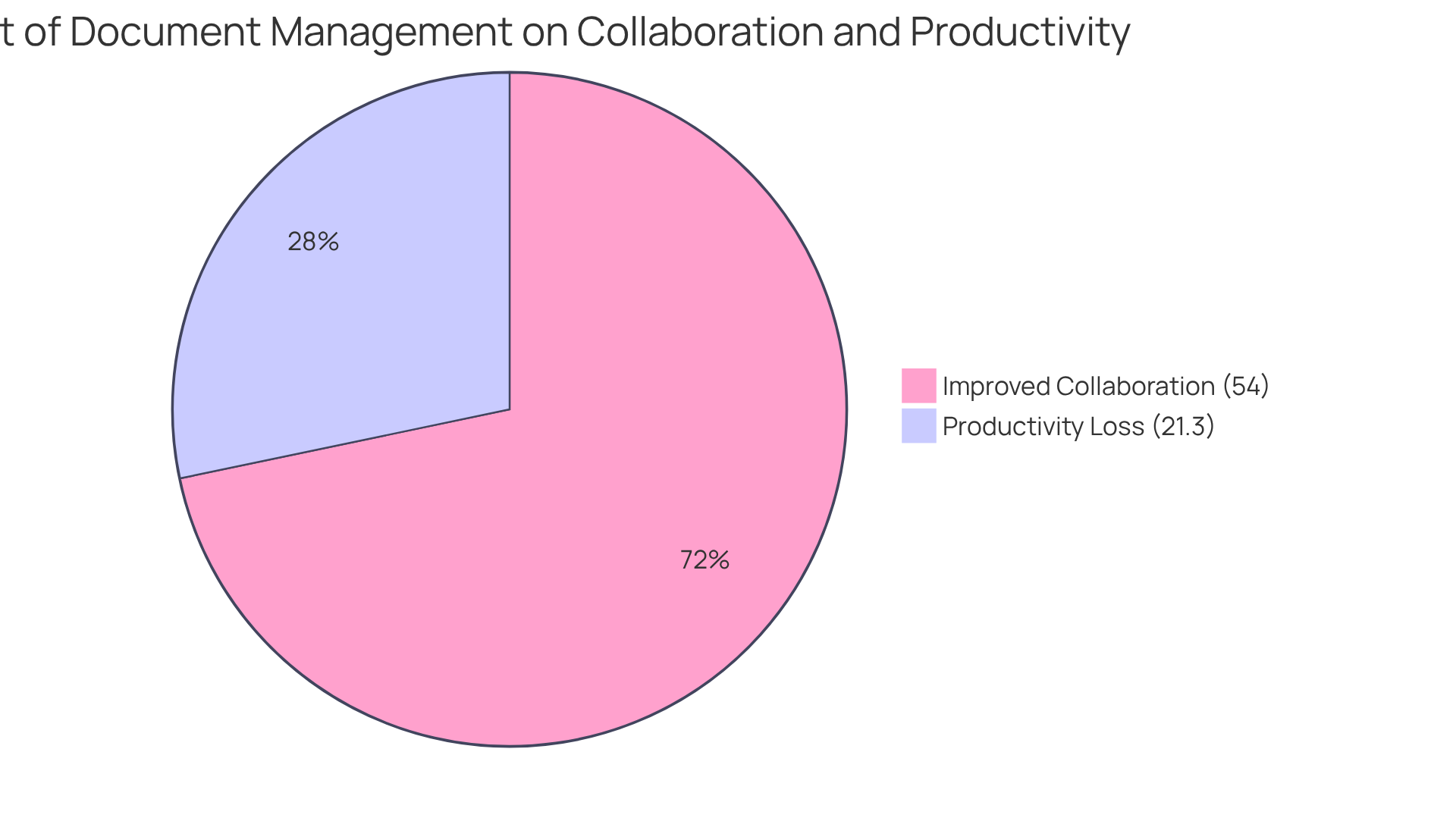
Now, let’s dive into why . Not only does it simplify workflows, but it also cuts down on the risks associated with . In fact, companies that struggle with this can see a 21.3% drop in productivity! Imagine this: organizations that put in place often report a significant boost in productivity, with 54% of them noting thanks to and digitization.
As Haisam Abdel Malak puts it, " often highlight the hidden chaos businesses face daily, but the real story lies in the frustration, wasted time, and missed opportunities that come with poor document handling." So, by tapping into BigQuery's features—like documenting those data schemas and queries—your team can not only streamline their but also align with . Ultimately, this leads to better business outcomes and a smoother ride for everyone involved!
Conclusion
You might be wondering just how crucial effective process documentation really is, right? Well, it’s super important, especially as organizations look to streamline workflows and boost productivity. By using tools like SowFlow, Google Docs, Notion, and others, teams can easily create, manage, and refine their process document samples. This ensures that everything runs smoothly and efficiently.
Throughout this article, we’ve highlighted some key insights on how automated solutions and collaborative tools can seriously up your record-keeping game. Think about it: SowFlow offers instant SOP creation, while Google Docs lets you collaborate in real-time. Each platform brings something unique to the table, contributing to a culture of transparency and accountability. Plus, the structured document review processes with Cflow and Whatfix’s interactive training capabilities show just how transformative well-documented workflows can be.
Ultimately, the journey toward efficient process documentation isn’t just about hopping on the latest tools; it’s about cultivating a mindset that values organization and clarity. As businesses continue to embrace automation and collaborative technologies, the call to action is pretty clear: let’s prioritize effective documentation strategies to cut down on chaos, boost productivity, and set the stage for future growth. So, why not embrace these insights and tools to elevate your organization’s documentation practices? Achieving operational excellence is just around the corner!
Frequently Asked Questions
What is SowFlow and how does it help with SOP creation?
SowFlow is an intuitive platform that enables users to create process document samples for Standard Operating Procedures (SOPs) seamlessly. It allows teams to record workflows directly from their browser using a Chrome extension, making records comprehensive and accessible, which fosters collaboration.
Why is workflow mapping important for organizations?
Workflow mapping helps organizations maintain structured operations, reducing chaos and boosting productivity. It enhances visibility into processes, which is crucial for effective record-keeping and operational efficiency.
What statistics highlight the benefits of automation in business?
According to the article, 91% of businesses report better visibility into their processes after automating, and 70% of business owners believe automation helps scale operations.
What is the expected trend regarding automation in businesses by 2025?
By 2025, it is expected that 80% of companies will use intelligent automation, indicating a growing trend towards streamlined workflows.
How does Google Docs facilitate collaborative document creation?
Google Docs allows multiple users to work on documents simultaneously, providing commenting and suggestion features for real-time feedback, which enhances teamwork and transparency in the writing process.
In what way does Google Docs support the creation of SOPs?
Google Docs simplifies workflows for teams by enabling collaborative creation and updating of process document samples for SOPs, ensuring that records remain relevant and accurate.
What advantages does Notion offer for process documentation?
Notion is a flexible workspace that combines notes, databases, and task management, allowing teams to create customized systems that fit their workflows. This flexibility improves efficiency and accountability in managing process document samples.
How can teams maximize their use of Notion for documentation?
Teams can maximize their use of Notion by regularly reviewing and refreshing their records to ensure that all documentation stays relevant and effective.
👍
What others are liking


5 Steps to outline your ideal documentation structure
5 MINS READ
Where to start the your journey of mapping out your ideal documentation structure, aligning it with the very heartbeat of your organization?
Defining a winning level of detail in your process
3 MINS READ
What is too much detail, and what is too little? This article described in that winning level detail about what detail is enough.


