


Key Highlights
- SowFlow simplifies the creation of organisational charts with a user-friendly interface, enhancing clarity and communication within teams.
- Lucidchart offers extensive customizable templates and collaborative features, improving teamwork and adaptability in diagram creation.
- Canva provides creative templates for engaging organisational charts, making it easy to create visually appealing visuals for presentations.
- EdrawMind allows for quick setup of professional-quality organisational charts, ideal for teams needing agile documentation.
- Asana integrates useful templates for organisational charts, facilitating project management and effective resource allocation.
- Microsoft 365 includes built-in tools like SmartArt for easy organisational chart creation, enhancing collaboration and efficiency.
- Boardmix enables real-time collaboration on organisational charts, improving team alignment and communication.
- The Aris Community offers a guide to organisational chart notation, promoting better understanding and efficiency in group collaboration.
- AdminDroid highlights the benefits of organisational charts in Microsoft 365, including improved clarity in roles and increased productivity.
- Trainual emphasises the importance of regularly updating organisational charts and provides best practises for effective documentation.
Introduction
Creating an effective organizational structure is key for any business that wants to boost communication and streamline operations. You might be wondering how to tackle this, especially with so many free tools out there. Luckily, organizations can easily whip up clear and visually appealing organizational charts that encourage collaboration and enhance clarity. But with all these options at your fingertips, how do you figure out which tool truly fits your unique needs and maximizes productivity?
Let’s dive into seven standout organizational chart tools that not only make the creation process a breeze but also empower your team to thrive in their collaborative efforts.
SowFlow: Instant Creation of Organizational Charts for Enhanced Clarity
You might be wondering how to make creating a easy. Well, that’s where comes in! This tool offers a super efficient solution for companies that want to streamline . With its , you can in real-time through a , ensuring everyone is on the same page with the latest info. No more wasting precious time or getting tangled up in confusion! With a , teams can focus on what really matters without the hassle of unclear reporting lines.
Speaking of clarity, let’s hear from Anastasia Masadi, a Product Owner, who says, " has been a game changer in the way we document work and deliver to our clients. I do not have to take each screenshot separately, and do not even have to leave the browser while I am creating SOPs and training materials. gave me time from my life back." Isn’t that amazing? Plus, studies show that companies with see a 25% . That really highlights how important it is to have , including a , in place.
So, why not leverage 's tools to and improve communication in your workplace? It’s all about fostering a more productive environment where everyone can thrive!
Lucidchart: Versatile Templates for Customizable Organizational Charts
You might be wondering how Lucidchart stands out in the world of diagramming tools. Well, it excels with its extensive library of , which includes a that caters to various . You can easily tweak these templates to fit your specific requirements, making it a fantastic choice for teams that value adaptability in their designs. Plus, the platform’s collaborative features let at the same time, which really .
Speaking of teamwork, did you know that studies show 73% of employees involved in collaborative work report improved performance? That’s a big deal! It highlights just how crucial is when it comes to creating structural diagrams. On the flip side, about 20% of employees lose up to six hours a week due to inefficiencies in collaboration. This really underscores the need for tools like Lucidchart to tackle those challenges head-on.
Users rave about Lucidchart’s . One user even shared, "The , including the , have changed how we visualize our company's structure, making it clearer for everyone involved." This flexibility not only but also ensures that everyone is on the same page, leading to smoother project execution. Now, let’s talk about security—Lucidchart takes the protection of sensitive employee data seriously, using . This means organizations can manage their information with confidence. And if you’re looking to connect with HR software, Lucidchart has got you covered, making it a comprehensive solution for operations managers eager to .

Canva: Creative Templates for Engaging Organizational Charts
You might be wondering how to quickly and easily. Well, Canva has got your back! This platform offers a ton of , including a , that are super user-friendly. With its drag-and-drop feature, you can whip up visuals that are not just informative but also eye-catching.
Now, think about those times when you’re or . Having can really make a difference in how well your audience understands and retains the information. So why not give Canva a try? You’ll find that it makes !

EdrawMind: User-Friendly Organizational Chart Maker for Quick Setup
You might be wondering how to . Well, EdrawMind offers a super simple way to create , making it a fantastic choice for to quickly. With its , you can whip up in just minutes. This means you can easily , including your free organizational chart, as your company evolves. It’s especially handy for groups that value . So, why not give it a try and see how it can make your life easier?
Asana: Resourceful Templates for Effective Organizational Chart Creation
You might be wondering how to simplify the development of in your project management efforts. Well, Asana has you covered with a range of useful templates designed just for that! This integration helps teams like yours visualize their structure with a while juggling tasks and projects, creating a comprehensive approach to managing your organization. Plus, updating your is a breeze, enabling you to reflect any changes in group dynamics so everyone stays informed and aligned.
But wait, there’s more! This capability not only but also supports and project execution. It’s truly an invaluable tool for modern teams. Speaking of enhancing your management game, have you thought about integrating ? They simplify the and make sure all your information is just a click away.
So, why not reach out to SowFlow today? Discover how our instant guide creation and can and . You’ll be glad you did!
Microsoft 365: Built-In Tools for Seamless Organizational Chart Creation
You might be wondering how can make your life easier. Well, it offers some pretty cool , like SmartArt in Word and PowerPoint, that let you create a free without breaking a sweat. If your organization is already using Microsoft products, these features are a game-changer! They simplify the creation process, so you won’t need any extra software. Plus, you can seamlessly add these visuals into your current workflows, which really boosts collaboration and ensures everyone has easy access to the .
The user-friendly design of SmartArt means you can customize your diagrams to match your team's unique style and branding. This integration not only makes things more efficient but also creates a where information flows freely throughout the organization. For instance, Alex Wilber, a Marketing Assistant, shared, "The offers a clear perspective of where employees belong within the company, assisting in outlining roles and responsibilities."
Speaking of enhancements, there’s exciting news on the horizon! The Org Explorer function for Outlook is set to launch by mid-April 2025, which will further amp up the capabilities of tools for visualizing company structures.
So, if you’re an , now’s the time to dive in and leverage these tools to that really and clarity within your teams.

Boardmix: Collaborative Organizational Chart Maker for Team Efficiency
You might be wondering how Boardmix can make your . Well, it’s designed for just that! With Boardmix, groups can in real-time, which significantly enhances interaction. Everyone gets to share their thoughts, leading to more precise and detailed graphs.
Now, think about it: how often have you felt out of sync with your team? The of Boardmix and ensures that everyone is aligned with the . It’s all about for your team. So, why not give it a try and see how it transforms ?
Aris Community: Comprehensive Guide to Organizational Chart Notation
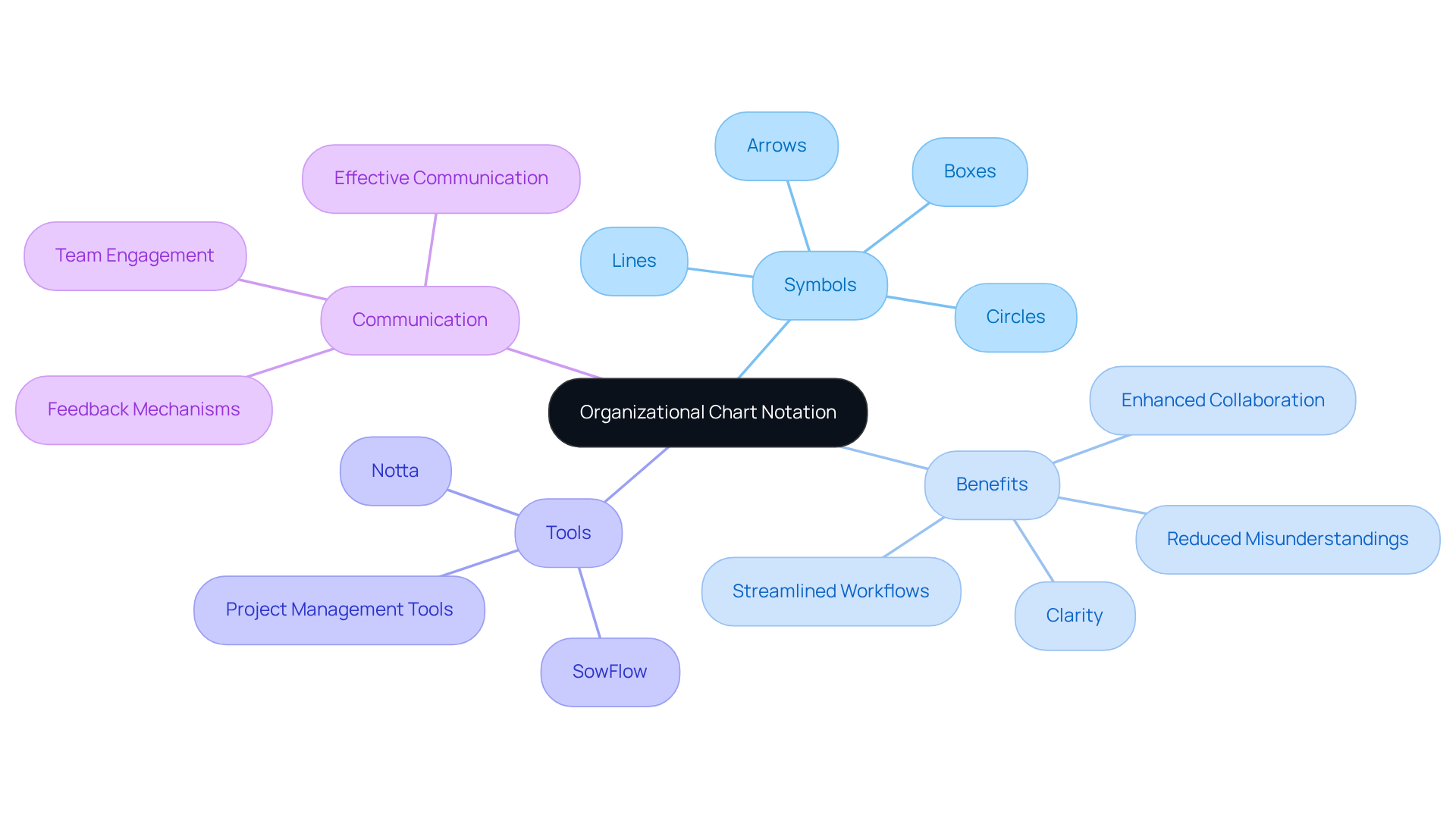
Are you looking to create ? The Aris Community has got you covered with a vital guide to creating notation. Mastering the different symbols and frameworks used in a can really within your groups. This resource is a gem for anyone wanting their diagrams, such as a , to be not just eye-catching but also super functional. You might be wondering how clear notation plays into this—well, it promotes better understanding among group members, leading to when utilizing a .
When entities adopt , they often see a boost in communication, particularly when using a . Why? Because members can quickly grasp roles and relationships with a , it helps to reduce misunderstandings and streamline workflows. Now, let's talk about how makes for structure visuals a breeze. It allows groups to keep their without the hassle.
As Viraj Mahajan puts it, " is the cornerstone of any organization and can set the stage for improved performance across the board." So, why not dive in and explore how these tools can elevate your team's communication game?
AdminDroid: Benefits of Organizational Charts in Microsoft 365
You might be wondering about the . Well, let me tell you—they can really improve clarity in reporting connections and promote better communication among groups! By utilizing these graphs, organizations can create a , simplifying their operations and ensuring that every member understands their roles and responsibilities. This clarity not only minimizes confusion but also contributes to a . In fact, did you know that entities implementing , like structural diagrams, can see productivity increases of up to 23%?
Now, let’s dive into another exciting aspect: organizations that use modern collaborative tools can experience ! This means teams can respond more effectively to challenges and seize opportunities as they arise. Plus, there are various kinds of structures—functional, divisional, matrix, and flat—that can be , making structure diagrams even more relevant.
Speaking of relevance, clearly outlined structures can assist in , ensuring smooth transitions in key positions. Overall, utilizing a within Microsoft 365 is a powerful resource for enhancing operational effectiveness and teamwork. So, , take a moment to evaluate your existing framework and consider introducing or revising your diagrams. It could really !

Trainual: Best Practices for Keeping Your Organizational Chart Updated
is super important for ensuring they’re effective and meaningful in your company. You might be wondering, how can operations managers make this happen? Well, it’s all about applying that reflect changes in team composition, roles, and responsibilities. By taking a systematic approach to these updates, you can ensure that structure diagrams remain valuable assets for everyone, making it clearer who reports to whom and encouraging collaboration. But hold on—it's crucial to approach changes carefully. Quick shifts in an organization's structure can lead to confusion and lower morale.
Now, let’s talk about how keep everything documented accurately. With SowFlow's , you can easily in just a few clicks. Here’s how it works:
- Install the free Chrome extension from the Chrome Web Store.
- Open the extension while browsing to document your process instantly.
- Save the documented workflow directly in your group's workspace for immediate access.
This nifty functionality helps maintain , making it easier for teams to adapt to changes quickly. Plus, it ensures that all . So, why not give it a try and ?

Conclusion
Using free organizational chart tools is super important for boosting clarity and communication within teams. These tools not only make the documentation process easier but also create a collaborative space where everyone knows their roles and responsibilities. By tapping into platforms like SowFlow, Lucidchart, and Canva, organizations can whip up visually appealing and informative charts that help streamline management and ramp up productivity.
You might be curious about which tools stand out. SowFlow shines with its real-time documentation efficiency, while Lucidchart offers customizable templates that really promote teamwork. Canva brings creative visuals that can jazz up presentations, and Microsoft 365 has built-in features that blend right into existing workflows. And don’t forget, keeping these charts updated is key! We’ve got best practices to help ensure they stay relevant and effective.
So, let’s wrap this up! The importance of picking the right organizational chart tools is huge. They play a crucial role in fostering effective communication, boosting operational efficiency, and ultimately driving team performance. Organizations should definitely explore these tools and think about how to implement them strategically to create a more organized and productive work environment. Embracing these solutions will lead to clearer structures and more successful collaborations, helping teams navigate their roles with confidence and clarity.
Frequently Asked Questions
What is SowFlow and how does it help in creating organizational charts?
SowFlow is a tool designed to simplify the creation of organizational charts, allowing companies to visualize their framework in real-time. It offers a user-friendly interface for creating free organizational charts, ensuring clarity and up-to-date information for teams.
What benefits does SowFlow provide to users?
SowFlow enhances clarity and communication in the workplace, streamlines documentation processes, and helps teams avoid confusion regarding reporting lines. It has been noted to save time and improve overall work performance by providing clear role definitions.
How does Lucidchart differentiate itself from other diagramming tools?
Lucidchart stands out with its extensive library of customizable templates, including free organizational charts. It allows for real-time collaboration among multiple users, which enhances teamwork and communication while adapting to specific organizational needs.
What are the advantages of using Lucidchart for creating organizational charts?
Lucidchart offers a user-friendly interface, customizable templates, and collaborative features. It improves performance through teamwork and addresses inefficiencies in collaboration, while also ensuring data security with encryption and access controls.
How does Canva facilitate the creation of organizational charts?
Canva provides a variety of creative templates for organizational charts that are user-friendly. Its drag-and-drop feature allows users to create visually appealing and informative charts quickly, making it ideal for presentations and onboarding sessions.
Why is having clear visuals important in presentations or onboarding?
Clear and attractive visuals help improve understanding and retention of information during presentations or onboarding sessions, making it easier for the audience to grasp complex structures and roles within an organization.
List of Sources
- SowFlow: Instant Creation of Organizational Charts for Enhanced Clarity
- 22 Insightful Statistics on Team Performance and High-Performing Teams (https://aiirconsulting.com/resource/22-statistics-that-reveal-the-truth-about-teams)
- HR analytics: role clarity impacts performance (https://effectory.com/knowledge/hr-analytics-role-clarity-impacts-performance)
- edrawmind.wondershare.com (https://edrawmind.wondershare.com/org-chart/company-organizational-chart.html)
- TOP 18 ORGANIZATIONAL STRUCTURE QUOTES | A-Z Quotes (https://azquotes.com/quotes/topics/organizational-structure.html)
- upraise.io (https://upraise.io/blog/importance-organizational-charts)
- Lucidchart: Versatile Templates for Customizable Organizational Charts
- theorgchart.com (https://theorgchart.com/best-org-chart-software)
- Quotes About Leadership & Teamwork: Inspiration for Collaboration (https://insidesalesexpert.com/blog/Quotes-About-Leadership-and-Teamwork-Inspiration-for-Effective-Collaboration)
- peoplemanagingpeople.com (https://peoplemanagingpeople.com/tools/best-org-chart-tools)
- 47 Workplace Collaboration Statistics and Trends in 2026 (https://proofhub.com/articles/workplace-collaboration-statistics)
- 31 statistics about collaboration in the workplace in 2025 (https://zoom.com/en/blog/workplace-collaboration-statistics)
- Canva: Creative Templates for Engaging Organizational Charts
- thirst.io (https://thirst.io/blog/employee-onboarding-statistics-for-2025)
- oak.com (https://oak.com/blog/employee-onboarding-statistics)
- 35 Great Statistics About Employee Onboarding | Eddy (https://eddy.com/article/onboarding-statistics)
- clickboarding.com (https://clickboarding.com/automation-efficiency/18-jaw-dropping-onboarding-stats-you-need-to-know)
- 25 Surprising Employee Onboarding Statistics in 2026 | StrongDM (https://strongdm.com/blog/employee-onboarding-statistics)
- EdrawMind: User-Friendly Organizational Chart Maker for Quick Setup
- businessresearchinsights.com (https://businessresearchinsights.com/market-reports/organization-chart-software-market-112779)
- 120+ Great Agile Quotes to Inspire Your Team (https://parabol.co/resources/agile-quotes)
- digital.ai (https://digital.ai/catalyst-blog/ten-agile-quotes-from-the-worlds-most-brilliant-minds)
- pmi.org (https://pmi.org/learning/library/agile-minded-professional-habits-agility-5977)
- edrawmind.com (https://edrawmind.com/article/category-how-to-and-tips)
- Asana: Resourceful Templates for Effective Organizational Chart Creation
- itdworld.com (https://itdworld.com/blog/human-resources/organizational-development-quotes)
- 50 Inspiring Quotes - Empowering Project Managers with Wisdom (https://linkedin.com/pulse/50-inspiring-quotes-empowering-project-managers-wisdom-ali-mazloum)
- 110+ project management statistics and trends for 2026 (https://monday.com/blog/project-management/project-management-statistics)
- edrawmind.wondershare.com (https://edrawmind.wondershare.com/org-chart/project-management-organizational-chart.html)
- 19 Timeless Project Management Quotes for Success (https://proofhub.com/articles/project-management-quotes)
- Microsoft 365: Built-In Tools for Seamless Organizational Chart Creation
- dileap.com (https://dileap.com/training-resources/build-an-org-chart-using-the-text-pane?language=en)
- quote.cloud (https://quote.cloud/microsoft-teams-with-quotecloud)
- statista.com (https://statista.com/statistics/983321/worldwide-office-365-user-numbers-by-country)
- blog.admindroid.com (https://blog.admindroid.com/top-benefits-of-using-an-organization-chart-in-microsoft-365)
- Boardmix: Collaborative Organizational Chart Maker for Team Efficiency
- electroiq.com (https://electroiq.com/stats/teamwork-statistics)
- Teamwork Statistics 2024: Importance of Collaboration | TeamStage (https://teamstage.io/teamwork-statistics)
- 47 Workplace Collaboration Statistics and Trends in 2026 (https://proofhub.com/articles/workplace-collaboration-statistics)
- 130 Team Building Statistics: Culture, Effectiveness, and Tools (https://flair.hr/en/blog/team-building-statistics)
- Collaboration Counts: Eye-Opening Teamwork Statistics for 2025 | Runn (https://runn.io/blog/teamwork-statistics)
- Aris Community: Comprehensive Guide to Organizational Chart Notation
- 60+ Must-know Workplace Communication Statistics in 2025 (https://notta.ai/en/blog/workplace-communication-statistics)
- itdworld.com (https://itdworld.com/blog/human-resources/organizational-development-quotes)
- 47 Workplace Collaboration Statistics and Trends in 2026 (https://proofhub.com/articles/workplace-collaboration-statistics)
- blog.bit.ai (https://blog.bit.ai/collaboration-statistics)
- 31 statistics about collaboration in the workplace in 2025 (https://zoom.com/en/blog/workplace-collaboration-statistics)
- AdminDroid: Benefits of Organizational Charts in Microsoft 365
- numberanalytics.com (https://numberanalytics.com/blog/organizational-coherence-stats)
- onedirectory.com (https://onedirectory.com/blog/the-benefits-of-organizational-charts)
- humand.co (https://humand.co/how-to-create-a-company-organizational-chart)
- collegehive.in (https://collegehive.in/docs/5th_sem/site/SM/Unit_06_Strategy_Execution/6.e_Dos_and_Donts_in_Developing_Organizational_Charts.html)
- shiftbase.com (https://shiftbase.com/glossary/organization-structure)
- Trainual: Best Practices for Keeping Your Organizational Chart Updated
- trainual.com (https://trainual.com/manual/when-should-an-organizational-chart-be-updated)
- youexec.com (https://youexec.com/questions/how-often-should-org-charts-be-updated)
- itdworld.com (https://itdworld.com/blog/human-resources/organizational-development-quotes)
- blog.phenomecloud.com (https://blog.phenomecloud.com/featured-blogs/21-insightful-quotes-about-hr-people-analytics)
👍
What others are liking


5 Steps to outline your ideal documentation structure
5 MINS READ
Where to start the your journey of mapping out your ideal documentation structure, aligning it with the very heartbeat of your organization?
Defining a winning level of detail in your process
3 MINS READ
What is too much detail, and what is too little? This article described in that winning level detail about what detail is enough.


